


Why an SMM Order Is Stuck: A Diagnostic Checklist
If your SMM order appears stuck on Pending, the first question should not be “How long should I wait?” It should be “What do I actually know about this order right now?” Confirm that the order was accepted, retrieve the latest available status, compare its age with the service estimate recorded when you ordered, and then check whether the original target or any overlapping activity has changed. If the issue still cannot be explained, contact support with one complete record rather than creating another order.
An unchanged status does not identify the cause by itself. The order may still be within a provider queue, the dashboard may be showing an older state, the target may have changed, another order may be interfering with attribution, or the provider may need to investigate something that is not visible from the customer side. Reordering immediately does not resolve that uncertainty; it can create a second transaction while the first remains active.
This checklist is designed to separate what you can directly observe, what you can reasonably infer, and what only the provider can confirm. The worked example is fictional. It is not a resolved customer incident, a benchmark for normal delivery times, or evidence that all orders with the same symptom have the same cause.
Verify what has actually stopped
Confirm an accepted order ID and last status timestamp
Begin with the order record rather than the public follower, like, or view count. Locate the accepted order identifier and confirm that it belongs to the service, quantity, and target you intended to use. An order ID is an important checkpoint because it distinguishes “I attempted to submit an order” from “the system accepted an order record.”
A submitted form, payment receipt, spinning browser tab, or timeout does not independently prove that an order was created. If the page failed during submission and you cannot find an order ID, inspect your order history and any confirmation already received before trying again. The risky scenario is assuming that a failed browser response means a failed order when the provider actually accepted the request.
For API users, the MoreThanPanel API reference documents a successful add request returning an order ID and provides a separate status action for retrieving the current provider-reported state. The status response can include the charge, start count, status, remaining quantity, and currency. Those fields are useful operational records, but they should not be confused with independent evidence about what a social platform ultimately counted or how an audience behaved.
Record the time when you last retrieved or viewed the status. Keep that observation timestamp separate from any actual state-change timestamp supplied by the system. If you open the dashboard at 12:00 and see Pending, the defensible statement is “Pending was observed at 12:00,” not “the order became Pending at 12:00.”
This distinction becomes particularly important for API integrations. MoreThanPanel’s API does not use webhooks to push order-state changes to your application; integrations retrieve status by polling. That means your own dashboard may simply be displaying the last snapshot your system requested. A locally cached Pending status can therefore be older than the provider’s current state.
If your application and the provider dashboard disagree, preserve both observations and obtain a fresh authorized lookup rather than choosing the result that fits your assumption. If a status request itself fails, record that as a retrieval failure, not as evidence that the underlying order failed. Your access to order information and the state of the order are separate facts.
A guide to SMM order statuses explains the labels used throughout the order lifecycle. This checklist addresses a narrower question: what evidence should you collect when the order appears to have stopped progressing? Keep the exact displayed label in your notes, even if its meaning needs clarification.
The sequence below separates sending a request, receiving an acknowledgement, and confirming an outcome. An acknowledgement is not a promise that delivery has finished.
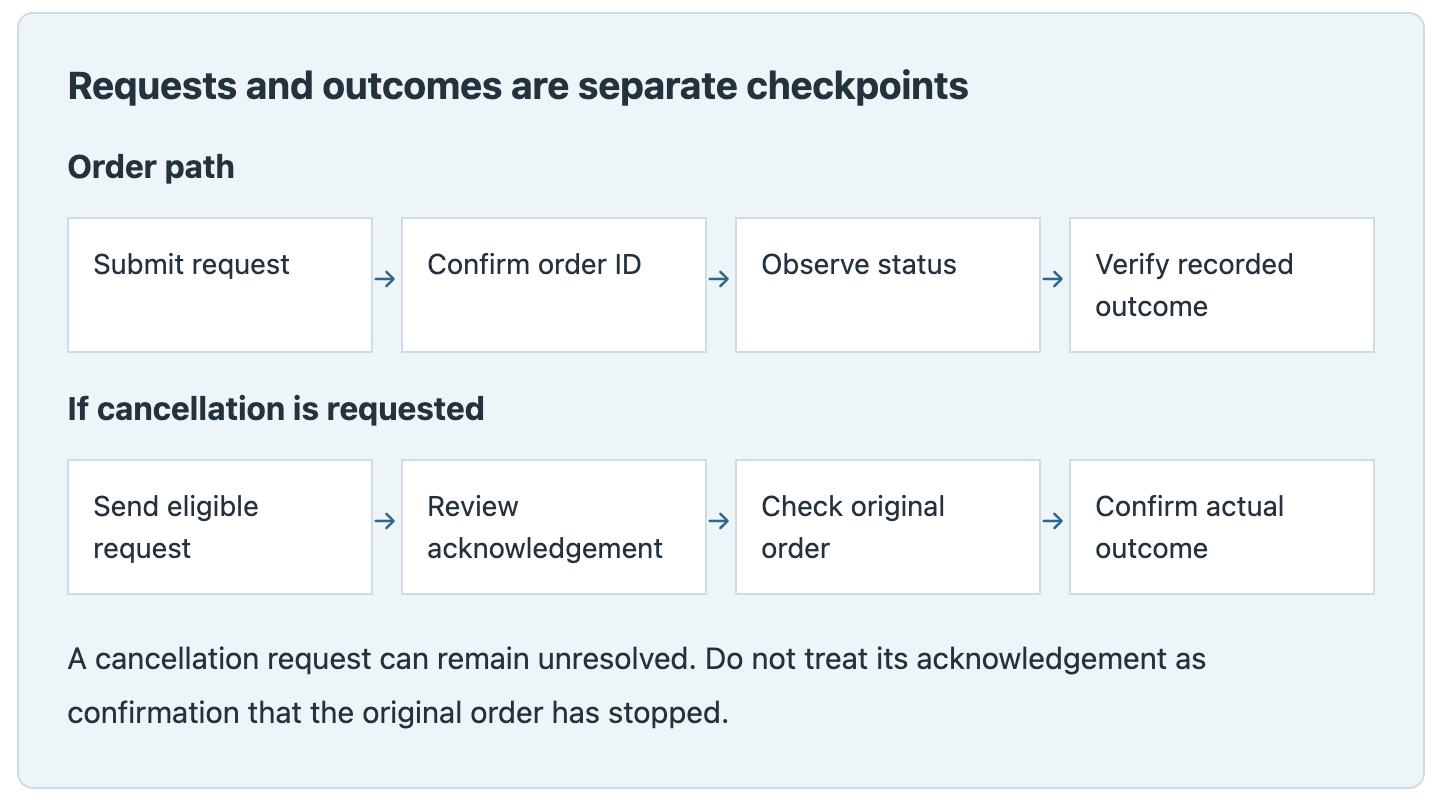
A cancellation request should not be treated as a confirmed cancellation. This is particularly important for API users because submitting a cancel action and observing the final state of the original order are two separate checkpoints.
Compare elapsed time with the recorded service estimate
Find the service description that applied when the order was placed. Identify exactly what its timing statement describes. “Starts within two hours,” “1K/day,” “instant start,” and “completed within 24 hours” describe different parts of the fulfillment process and should not be treated as interchangeable deadlines.
Calculate elapsed time using one consistent time zone. Record the submission time and, if it is separately available, the acceptance time. Then compare the elapsed period with the event actually described by the service. If the listing says “up to two hours to start,” an order can exceed two hours before completion without contradicting that estimate; the relevant question is whether delivery has started.
MoreThanPanel’s published service policy describes catalog start times and delivery speeds as estimates based on normal operating conditions rather than hard guarantees. This matters when diagnosing an apparent delay: exceeding an estimate justifies investigation, but it does not by itself identify the cause or prove that the order has permanently failed.
Avoid replacing the service’s actual wording with generic rules such as “Pending for 24 hours means failed” or “every order should start in one hour.” Different services can use different upstream sources, queues, limits, and delivery profiles. The most useful comparison is between this order and the expectation recorded for this service when it was placed.
Choose your next check from that estimate or from a checkpoint provided by support. Refreshing the dashboard every few minutes without recording new information does not improve the diagnosis. A useful timeline records meaningful changes: status update, target change, support response, incident notice, or another event that affects the next decision.
If the service offered no meaningful timing estimate, record that fact. Missing information is not a license to invent a deadline. Ask support which timing expectation applies to the accepted order.
Preserve the service wording you relied on if possible. Service catalogs can change, and the description visible today may not be identical to the one displayed when you ordered. If you did not save the original description, say so explicitly rather than presenting a current listing as historical evidence.
Check conditions the customer can observe
Confirm the original target remains available
Open the exact target stored on the order and confirm that it still identifies the intended profile, post, video, channel, or other resource. Look for changes that happened after submission: the account was renamed, the post was removed, visibility changed, the content became restricted, or the URL now redirects somewhere different.
The important point is to record what you can actually observe. “The post now returns unavailable when opened from a logged-out browser” is evidence. “The provider therefore cannot access the post” is an inference that the provider may still need to confirm.
A target can also remain technically accessible while no longer matching the conditions under which the service was ordered. For example, a username change can alter the URL even though the account itself still exists. Preserve the original target in your records so support can compare what was submitted with what exists now.
Do not change privacy settings simply to force delivery through unless you are authorized to make that change and understand its consequences. Likewise, avoid deleting the target, replacing it, changing the username, or repeatedly editing relevant settings while the order is under investigation. Those actions can change both the delivery conditions and the evidence needed to diagnose the original problem.
For future submissions, use the SMM order preflight checklist to review links and limits before ordering. Here, the task is to document the current order, not create a replacement prematurely.
Identify another active order against the same target
Check whether you, a colleague, an automated integration, a reseller system, or another authorized administrator submitted additional activity against the same target. Look for matching URLs, similar timestamps, recurring schedules, API retries, and orders placed after an ambiguous response.
This matters because two order IDs normally represent two separate accepted transactions, not two visual representations of one transaction. If your integration retried a submission because it did not receive the response it expected, the second request may have created another real order.
MoreThanPanel’s current FAQ specifically warns against stacking multiple orders for the same link while the first order remains active. Even when a different provider behaves differently, overlapping activity still creates a basic measurement problem: a change in the public counter no longer tells you which accepted order caused which units.
Preserve all relevant order IDs and identify their relationship. Do not assume that deleting a record from your own CRM, spreadsheet, or reseller interface cancels a transaction already accepted upstream.
An overlapping order is still an observation, not a confirmed explanation for the delay. Ask the provider whether the overlap affects processing, status, or remedy eligibility for the specific orders involved.
If several people manage the account, assign one person to maintain the investigation record and ask the others to avoid new submissions against the target until the existing transactions are understood. That is an operational control designed to preserve evidence, not a claim that every SMM service technically blocks concurrent orders.
Separate likely causes from verified causes
Queue delay and provider outage require different evidence
A Pending label cannot tell you by itself whether the order is sitting in a queue, waiting on an upstream supplier, affected by the target, displayed from stale data, or part of a broader service issue. The most useful investigation separates three categories: observed fact, possible explanation, and verified explanation.
“Order status was Pending at 10:00 and still Pending at 12:30” is an observation. “The provider must be overloaded” is a hypothesis. “Support confirmed at 13:10 that Service 845 is affected by an upstream queue delay” is stronger evidence because the explanation now comes from a source with access to the fulfillment system.
Even then, scope matters. An announcement about website maintenance does not automatically prove that delivery infrastructure is down. An incident affecting Instagram follower Service A does not necessarily explain a YouTube view order. Match any incident notice to the affected service, time period, and order whenever possible.
The reverse is also true: the absence of a public incident notice does not prove that every service is operating normally. Upstream issues can be service-specific and may not appear on a public status page.
If you manage many orders, patterns can help prioritize an investigation. For example, twenty orders from the same service remaining unchanged while unrelated services continue normally is more informative than one isolated delay. It is still evidence of a pattern, not proof of its technical cause.
Use this decision table to organize the next step. Its interpretations are conditional; it is not a list of confirmed causes.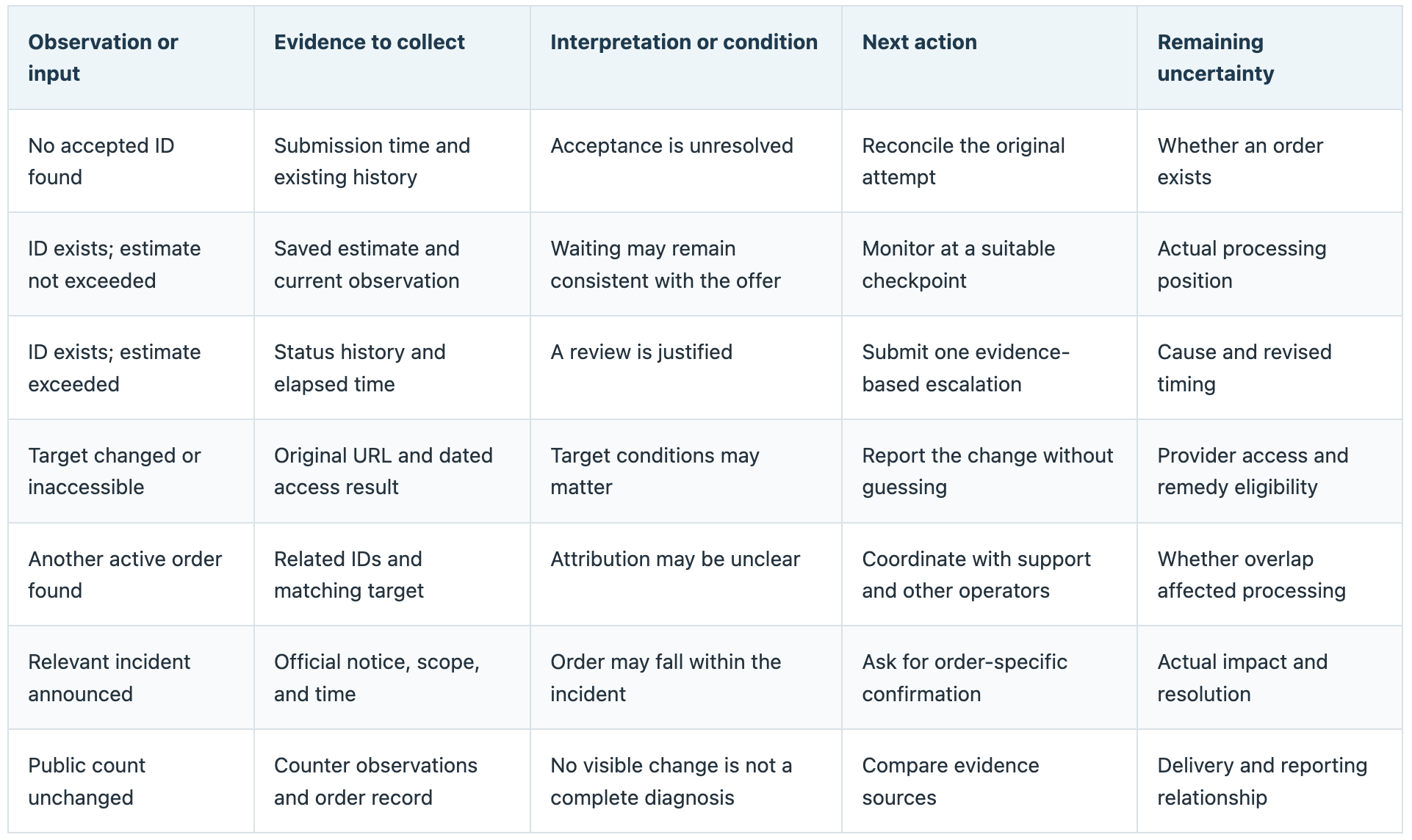
Illustrative walkthrough: an unchanged order. A customer records order DEMO-01 at 10:00 UTC. The saved service description gives an estimated start window of up to two hours. At 11:00 UTC, the order still displays Pending. The original target remains available, and no overlapping order has been identified.
At 12:30 UTC, the customer checks again and records the same status. Two hours and thirty minutes have elapsed, placing the order thirty minutes beyond the saved start estimate. That fact justifies escalation, but it does not prove a provider outage, queue problem, failed target, cancellation, or any other specific cause. The customer submits one support request referencing the existing order rather than creating another.
Support acknowledges the case at 13:00 UTC and says the order is being investigated. That acknowledgement confirms only that support received the request. Until the order itself changes or support provides a verified explanation, the technical cause and final outcome remain unresolved.
The useful result of this process is not necessarily an immediate diagnosis. It is a clean evidence trail that allows the unresolved question to be investigated without contaminating the case with duplicate orders or invented explanations.
Your decision record. Copy the blank row below for each meaningful checkpoint. Enter the observation first, then the interpretation. Leave unknown details explicitly unresolved. This makes it much harder for a later explanation to be remembered as something you already knew at the start.

A slow counter is not proof of no delivery
A public social-media counter and an SMM panel order status measure different things. Neither should automatically overwrite the other.
Suppose a follower count increases by twenty and later decreases by twenty. The final visible total is unchanged, but an unchanged total does not prove there were no additions during the interval. It only tells you that the net change was zero. Additions, removals, organic follows, unfollows, account removals, and platform-side adjustments can occur during the same period.
The reverse problem exists in provider data. A status response that reports a remaining quantity is useful for understanding what the provider's system currently records, but it does not independently verify the platform's visible counter or tell you whether the activity represents genuine audience behavior.
Keep both data sources with their timestamps. For example: “Provider status reported In Progress with 400 remaining at 14:00 UTC; public profile count was 12,450 at 14:03 UTC.” That statement preserves the evidence without pretending the two measurements are identical.
Use the same metric and display surface when comparing observations. A profile follower count, a post like count, an analytics dashboard, and an abbreviated public counter can all represent different measurements. If the platform rounds large values, record the displayed value as rounded rather than reverse-engineering an exact count you cannot see.
Avoid converting ambiguous observations into precise delivery percentages. “The visible profile count did not change between these two checks” is defensible. “Zero units were delivered” may not be.
If the order later changes to Completed while the public count still appears inconsistent, the diagnostic question has changed. Preserve the Pending timeline, then investigate the count discrepancy as a separate stage rather than continuing to call the order stuck on Pending.
Escalate once with a complete record
Provide order ID, service ID and timestamped observations
When escalation becomes appropriate, use the provider's official support channel and send enough information for the recipient to identify the transaction without having to reconstruct the case from several messages.
Include:
The accepted order ID and service ID, where available.
The original target URL and requested quantity.
Submission or acceptance time, with the time zone stated.
The recorded service estimate and its source.
Current status, observation time, and relevant earlier checks.
Any target changes, overlapping orders, or applicable incident notice.
The question you need answered and any existing ticket reference.
Do not send credentials as diagnostic evidence. Passwords, API keys, recovery codes, session tokens, or complete payment-card details should not be included in a support ticket. Redact unrelated customer information from screenshots, particularly if you operate an agency or reseller account containing several clients.
If no accepted order ID exists, say so clearly. Provide the submission time, service, target, payment or balance reference where appropriate, and explain that the unresolved question is whether the system accepted an order at all.
For the fictional example, the core support message could be: “Order DEMO-01 still displayed Pending at 12:30 UTC after a 10:00 UTC submission. The saved estimated start window was up to two hours. The original target remains available, and I found no overlapping order. Please confirm the current processing state, whether any action is required from me, and the next review point.”
The strength of that message is not its length. It states what happened, what has already been checked, what remains unknown, and what answer is needed.
After receiving a reply, classify it correctly. “We received your ticket” is acknowledgement. “We are checking with the provider” is investigation. “Please make the target public” is a requested customer action. “Order was canceled and the balance was credited” is a reported resolution that can then be verified in the account records.
Keep new evidence in the same case where practical. If support asks you to review the order again at a particular checkpoint, record that instruction and return with the new observation rather than opening several duplicate tickets about the same unchanged state.
Avoid duplicate orders while the first outcome is unknown
Do not use reordering as a diagnostic tool. If the first order eventually begins while the second has also been accepted, you now have two live transactions, two charges, and a much harder attribution problem.
Cancellation requires the same discipline. MoreThanPanel’s API documentation exposes a cancellation-request action, but the fact that a cancel request was accepted is not the same thing as proving that the original order has already reached a canceled final state. Check the subsequent record of the original order and any associated balance movement before treating cancellation as complete.
The provider's published policy also makes an important distinction: once an order has entered automated processing, customers should not assume that it can always be manually paused, edited, or canceled. Cancellation availability depends on whether the service and system expose an eligible cancellation path.
If a remedy is proposed, name the event accurately. A refill is additional fulfillment. A balance adjustment is an internal financial credit. A cancellation stops or closes an eligible transaction. A payment refund would refer to money being returned through a payment mechanism. One does not automatically imply another.
Continue using the same support case when the only development is new evidence about the existing order. “Escalate once” does not mean you may never follow up; it means avoid creating multiple simultaneous cases that contain the same question and no new information.
If many orders are affected, you may also need an incident-level record identifying the service, time range, number of affected orders, and shared symptoms. Keep that broader view separate from the individual order histories. A general incident summary should not erase the fact that one order may ultimately complete while another becomes Partial or Canceled.
Close the investigation when you can document the actual outcome: final order state, any confirmed financial adjustment, any refill or cancellation result, and any remaining uncertainty about the cause. If support never establishes the technical reason, record cause not confirmed rather than filling the gap with the most plausible theory.
Only then should you decide whether to submit another order, using the current service conditions and any specific instructions received during the investigation.